CARIS HPD Paper Chart Editor
 CARIS HPD Paper Chart Editor
CARIS HPD Product Editor
CARIS HPD Source Editor
CARIS S-57 Composer
CARIS Paper Chart Composer
Menu | Edit > Edges > Intersect |
Intersect selected features. New edges are started at each intersection point but the features are not divided.
Selected features | Result |
|---|---|
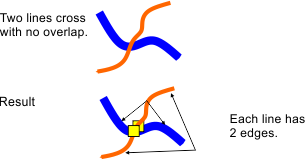
Area boundaries or lines that cross but do not overlap. Spatial attributes are not considered. | Edges are created at the point or points where the lines cross. No edges are shared. Spatial attributes are unchanged. Example:
|
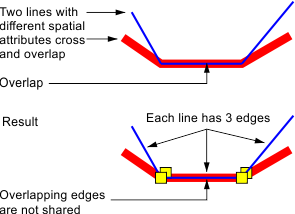
Area boundaries or lines with different spatial attributes and with at least one line that overlaps another. | Edges are created at the point or points where the lines cross. Overlapping edges are not shared, Example:
|
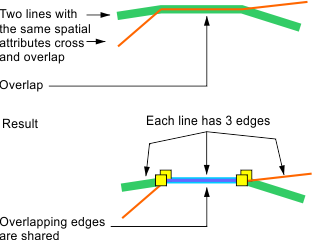
Area boundaries or lines with the same spatial attributes and with at least one line that overlaps another | Edges are created at the point or points where the lines cross. Overlapping edges are shared, even if the overlapping line is not selected. Example:
|
To cancel the operation during processing, press <Esc>.
If edges are shared, changes to one edge are applied to the other. You can see shared edges in the Features window.
You can see the spatial attributes of lines in the Spatial Attributes window.
This command may create redundant edges. You can check for redundant edges using the QC test Redundant Edges, Points and Soundings in the Validation command.
Related commands:
• • • • • • • • • • • | • • • • • • • • • • • |
Procedure
1. Select one or more features.
Features can be areas, lines, or both.
2. Select the Intersect Edges command.
The edges of each feature are divided at each intersection point.
You can see the edges in the Components window.