CARIS HPD Paper Chart Editor
 CARIS HPD Paper Chart Editor
CARIS HPD Source Editor
CARIS S-57 Composer
CARIS Paper Chart Composer
Menu | Edit > Edges > Smooth & Filter |
Tool |
|
Smooth and filter the edges of selected lines and areas.
Related commands:
• • • • • • • • • • • • | • • • • • • • • • • |
Interface
Option | Description |
|---|---|
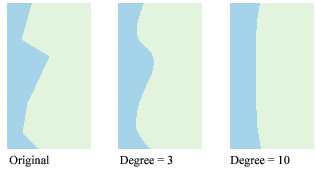
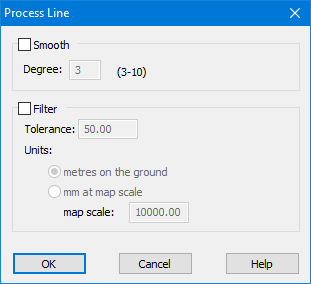
Smooth | Smoothing interpolates a curve through all selected vertices. The amount of smoothing is determined by the degree of the polynomial, which ranges from 3 to 10. The lowest value represents a precise curve interpolation that results in minimal smoothing. A higher value represents a looser curve interpolation that results in greater smoothing.
|
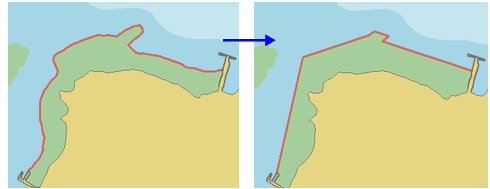
Filter | Filtering removes vertices from a line or area border using the Douglas-Peucker algorithm. The tolerance determines the amount of processing done. The larger the tolerance, the fewer vertices that remain.
See Douglas-Peucker Algorithm for more information on how the algorithm works. |
Procedure
1. Select one or more lines or areas.
2. Select the Smooth and Filter Edges command.
The Process Line dialog box is displayed.
3. Enable Smooth or Filter or both.
4. Set any other necessary options.
5. Click OK.
The selected features are smoothed, filtered, or both.