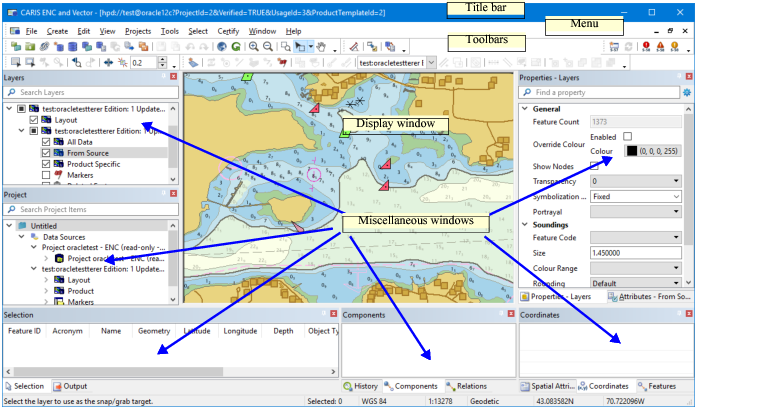
All HPD editors and the two Composers have a main interface window with a title bar and status bar, plus windows, a menu bar, and several toolbars.
The title bar contains the following items:
• Application icon
• Name of the application and of the active workspace
• Control buttons: minimize, restore, and close.
Status bar
The status bar displays the following information:
• Operation currently taking place, if any
• Number of selected features
• Coordinate reference system
• Scale of the view
• Coordinate type
• Coordinates of the cursor.
If you position the cursor over the coordinate reference system, a tooltip provides more information.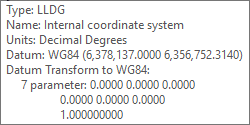
If the coordinate reference system is projected, you can modify the coordinate reference system, the coordinate type, and the measurement type by clicking on the appropriate area of the status bar.
Display window
The Display window contains the graphic representation of the contents of a file. This could be, for example, the data in an HPD database in Source Editor or Product Editor, a chart in Paper Chart Editor or Paper Chart Composer, or a product in S-57 Composer.
Miscellaneous windows
The miscellaneous windows contain information about the dataset in general or about features, plus the results of various commands, and more. The Publications Module contains miscellaneous windows only, no Display window.
See Windows for details on the various windows.