 CARIS HPD Paper Chart Editor
 CARIS HPD Paper Chart Editor
CARIS HPD Source Editor
=CARIS Paper Chart Composer
Tool |
|
A text style is a group of formatting settings that can be applied in a single step.
Text styles are applied to entire new text strings and to selected characters of existing text.
Always check the toolbar settings before adding text. Toolbar settings are remembered from the last selected text and will be applied to any new text if you do not change them first. |
Related commands
• • • • • • | • • • • • |
Interface
Text style commands and dialog boxes:
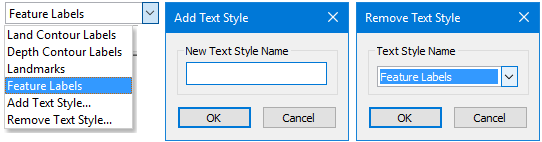
• <Text style name>: All existing text styles. Select the style to be applied to the text feature.
• Add Text Style: Create a new text style using the current settings in the Text toolbar
• Remove Text Style: Delete a text style.
Procedure: Select a style
1. Select an existing style from the text style list.
2. Add text.
The text will added using the selected style.
