 CARIS HPD Paper Chart Editor
 CARIS HPD Paper Chart Editor
CARIS HPD Source Editor
CARIS -57 Composer
CARIS Paper Chart Composer
Menu | Select > Text |
Select text features based on the content of the text string.
Related commands
• • • • • • | • • • • • |
Interface
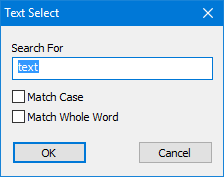
Option | Description |
|---|---|
Search For | The string you are searching for. Wildcard characters such as * and ? can be used. Type in the box, |
Match Case | On: Only text strings using the same case as the search term will be selected. Off: Search strings will be selected regardless of case. |
Match Whole Word | On: Only words that match the search term will be selected. For example, if you type Off: Text strings that match the search term will be selected even if they are part of a word. |
Procedure
1. Select a layer.
2. Select the Select by Text String command.
The Text Select dialog box is displayed.
3. Type the search string.
4. Set any other options.
5. Click OK.
Text features that contain the search term will be selected.