The following text types can be added to a panel:
• Linear text
• Annotations
• Contour and depth labels
• Block text
• Text from a file.
The first three text types are available in Source Editor and Paper Chart Editor. The block Text and Text from File options are available only in Paper Chart Editor. Linear text, annotations, and labels can modified in the editors. Special text effects can also be added.
Related commands:
• • • | • • • |
Text Effects
The following effects can be added to text features:
• Text box (TB): displayed as a bordered background behind each text feature.
• Text halo (TH): displayed as a coloured outline around each character of the text feature.
• Text symbol (TS): displayed behind the text feature.
The types of text objects to which effects are applied, and the attribute values used, are included in the text definition file. A sample copy of this file, text_symbology.dic, is located in ..\Program Files\CARIS\HPD\<version>\system\ PCEConfig\samples.
Box
To apply the text box effect to text, you must enter values for the following parameters:
• Fill colour
• Outline colour
• Outline thickness (in millimetres)
• Top/bottom/left/right margins (each margin value in millimetres).
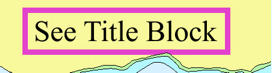
The following definition is an example of text box parameters as applied to General Name ($genam) text features.
"$genam","","TB(Land_Area,Nautical_Purple,0.5,1.0,1.0,1.0,1.0)","8","S","DISPLAYBASE","0" |
Using the above settings, all $genam text features are displayed similar to the one shown below.
Halo
To apply the text halo effect to text, you must enter values for the following parameters:
• Halo colour
• Halo width (in millimetres).
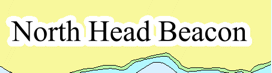
The following definition is an example of halo parameters as applied to Beacon Name ($bcnam) text features.
"$bcnam","","TH(White,0.5)","8","S","DISPLAYBASE","0" |
Using the above settings, all $bcnam text features are displayed similar to the one shown below.
Symbol
To apply the text symbol effect to text, you must enter values for the following parameters:
• Symbol name
• Symbol size (in millimetres),
• X/Y offsets (in millimetres)
• Rotated angle (in degrees, counter-clockwise rotation).
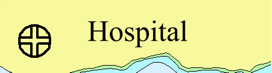
The following definition is an example of associating a $lndmk text to a symbol.
"$lndmk","","TS(ALHO,3.0,-5.0,0,0)","8","S","DISPLAYBASE",","0" |
The symbol is displayed next to the $lndmk text feature.