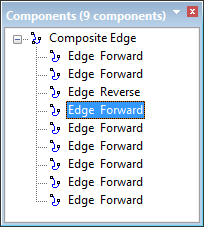
The Components window displays spatial information about a superselected feature.
1. Do one of the following:
• Select a single feature.
• Highlight a single feature from the list in the Selection window.
Component information is displayed in the Components window.
If the feature is a line or an area, the components are edges which can be manipulated. You can select edges in the Display window or in the Components window.
To select one or more edges in the Components window:
2. Do one of the following:
• Click on the edge.
• Press <Ctrl> and click on several edges.
You can also select an edge in the Display window. Press and hold <C> and click on the edge of the superselected feature. The edge is highlighted in the Components window. |
When edges are selected, you can manipulate them using this pop-up menu:
• • | • |
To zoom and centre on a component in the Display window, double-click the entry in the Components window.
Related commands
• • • • • | • • • • |