 CARIS HPD Publications Module
 CARIS HPD Publications Module
Menu | Edit > Add |
Tool |
|
Pop-up | Add (Object Browser) |
Associate an attribute to an object or complex attribute in a publication catalogue.
For more information on attribute bindings, see Attributes.
Related commands
• • • • • | • • • • • |
Procedure
1. Make sure that a catalogue is already open.
2. Expand the Objects layer or Attributes layer in the Object Browser window.
3. Select the an object or complex attribute.
4. Select the Add command.
The Select Attribute Type dialog box is displayed.
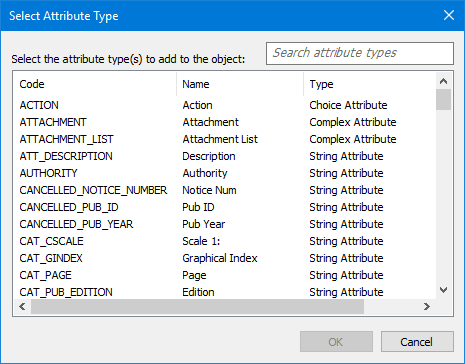
5. Select the attribute that is to be associated with the object or complex attribute.
6. Click OK.
The new attribute binding is displayed in the Object Browser.
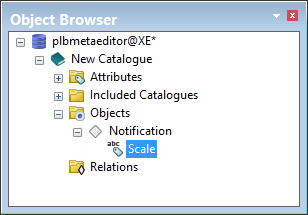
The properties for the attribute binding are displayed in Properties window.
7. Complete the following values in the Properties window.
Property | Description |
|---|---|
Code | Name of the attribute that is used as an XML tag. The following rules apply to this field: • Names can contain alphanumeric characters • Names cannot start with a number or punctuation character • Names cannot start with • Names cannot contain spaces (use the underscore character to represent a space) |
Name | This is the attribute name that is displayed in the Object Browser. The name can contain spaces. |
Attribute Type | This field is automatically filled with the attribute that was selected earlier. |
Read Only | Yes or no |
Hidden | Yes or no. |
Use in Summary | Yes or no. Define whether the attribute value is to be shown in the Object Browser as part of the Summary/Label for an instance of an object. |
Minimum # of values | Minimum number of items in a list. If the list is dynamic, leave this at 0 |
Maximum # of values | Maximum number of items in a list. If the list is dynamic, leave this at -1. |
