 CARIS HPD Publications Module
 CARIS HPD Publications Module
Menu | Catalogue > Set Active Catalogue |
Set a catalogue as active.
While a catalogue is active, only publications or publication components associated with that catalogue are displayed when the Open > Publications or Open > Projects commands are applied.
The selected catalogue must be validated and published.
Related commands
• • • • • | • • • • • |
Interface
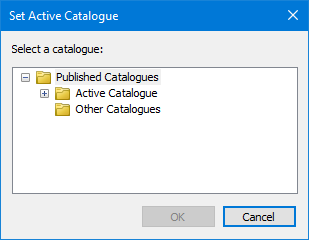
Option | Description |
|---|---|
Select a catalogue | List of catalogues. Click + to expand the list. Select a catalogue. |
Procedure
1. Select the Set Active Catalogue command.
The Set Active Catalogue dialog box is displayed.
2. Select a catalogue.
3. Click OK.