 CARIS HPD Publications Module
 CARIS HPD Publications Module
Menu | File > New > Catalogue |
Tool |
|
Create a new catalogue for organizing publication content.
You can build a new catalogue from a base catalogue or import an existing XML catalogue into a base catalogue. A sample XML catalogue named publication_catalogue.xml is located in ...\Program Files\CARIS\HPD\<version>\system\PubConfig\SampleCatalogue.
A base catalogue contains read-only objects, attributes and other components and cannot be edited. But you can use this catalogue to derive your own components and save these to a new catalogue.
Related commands
• • • • • • • | • • • • • • |
Procedure
1. Select the New Catalogue command.
The Select Base Catalogue dialog box is displayed
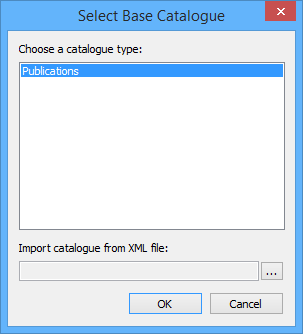
Currently, there is one base catalogue. This catalogue is automatically selected.
2. [Optional] Click Browse to load an XML catalogue into the database.
3. Click OK.
The new catalogue is displayed in the Object Browser.
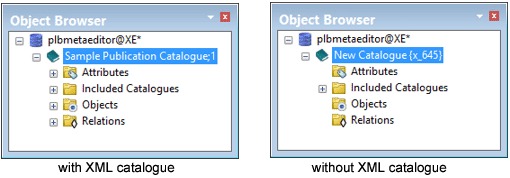
If a ready-made XML catalogue is loaded, attributes, objects, and relations are available and can be edited. If only the base catalogue is loaded, objects, attributes and relations must be added.
Both catalogues contain an Included Catalogues folder. This folder contains base objects and attributes.
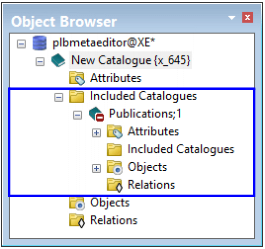
The catalogue name and version can be set in the Properties window.
4. In the Layers window, select the top catalogue layer.
5. Make sure the Properties window is displayed.
6. Define the following properties:
Property | Description |
|---|---|
Name | Type a name for the catalogue and press <Enter> |
Version | Type a version number for the catalogue and press <Enter> |
The catalogue is renamed. The version is displayed beside the name.
