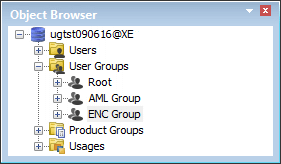
User groups are assigned read/write or read-only access to specific usages and products. Data is hidden from persons without access. HPD users can be assigned to user groups.
For example, defence-related data can be concealed from persons without security clearance. A regional hydrographic office can have read/write access to its own products and read-only access to products from other regions.
User and product group functionality is optional. If not applied, access is the same for new schemas as in previous HPD versions. If you create AML or VPF data, the AML scale bands or VPF usages must be assigned to a user group. |
The following conditions apply to user and product groups:
• A user group must have a unique name.
• A user group has either read/write, read-only, or no access to each usage.
• A user group has either read/write, read-only, or no access to each product group
• A user can belong to more than one group.
• A user with an administration role can add, remove, or rename user groups
• A product group can be accessed by more than one user group.
When new products are created, users must assign the product to a product group.
Example
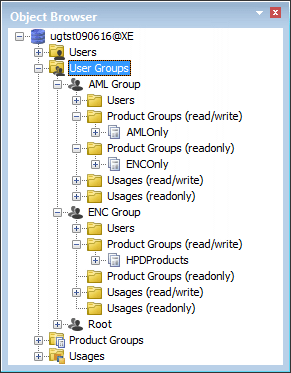
This example demonstrates how user and product group functionality organizes data and product access.
A schema contains both AML scale bands and ENC navigation usages. Two groups are responsible for these products: an AML group and an ENC group.
• The AML group has read/write access to AML scale bands and products and read-only access to ENC usages and products.
• The ENC group has read/write access to ENC usages and products but no access to AML scale bands or products.
AML Group and ENC Group are added (see Add User Groups).
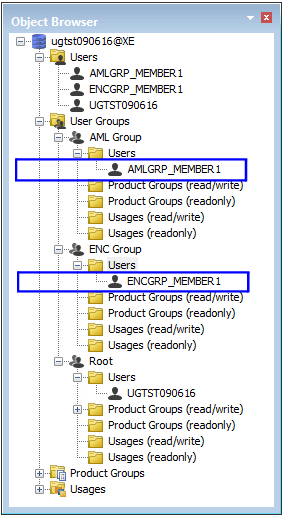
Users are created in User Manager (see User Manager) and automatically added to both the Root users group and the Users layer.
Users are assigned to AML and ENC groups by dragging users from the Root users group to their respective groups. In this example, users AMLGRP_Member1 and ENCGRP_Member1 are moved from the Root folder to their respective user groups.
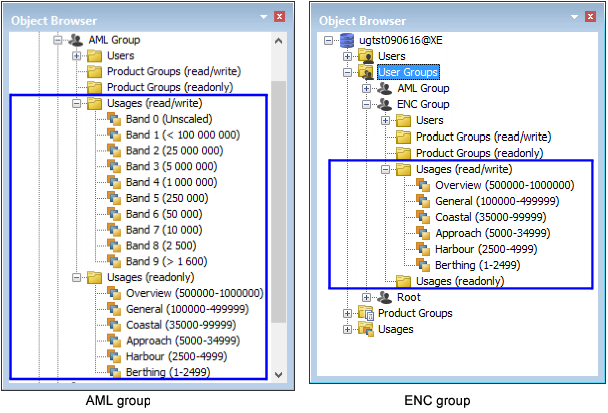
The AML Group is given read/write access to AML scale bands and read-only access to ENC navigational usages by dragging scale bands and navigational purposes from the Usages folder to the Usages folders for the AML Group.
The ENC Group is given read/write access to the navigation usages but no access to the AML scale bands because no scale bands have been assigned to this group.
Products are assigned to different user groups through product groups. When new products are created by persons in a user group, those products are assigned to that group.
There are three product groups in this example: AMLOnly, ENCOnly and HPDProducts.
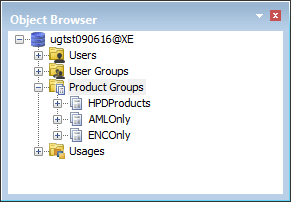
HPDProducts is a default group. All existing products are assigned to this group.
Products that are assigned to a user group for development and modification are placed in the read/write group.
In this example, the AML Group has read/write access to AML products and read-only access to ENC products. The ENC Group has read/write access to ENC products and no access to AML products.
Related commands
• | • |