 CARIS HPD Publications Module
 CARIS HPD Publications Module
Menu | Edit > Add |
Tool |
|
Pop-up | Add (Object Browser) |
Create a new chart notice in the Pending Notices section of the Object Browser or directly in a publication.
Notice attributes are entered in the Property window after a notice is created. Notice attributes can include general information such as notice number, country and location, other survey authorities, cancellation notes, etc.
Related commands:
• • • • • • • | • • • • • • |
Procedure in Pending Notices
1. Select a notice type in the Pending Notices section of the Object Browser.
2. Select the Add command.
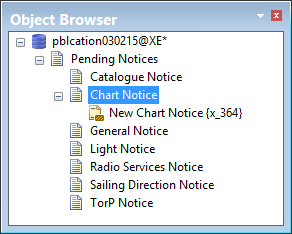
A notice is created. The notice is automatically assigned an internal number. This is not a notice ID.
A notice is created.
Procedure in a publication
1. Select a publication or publication section layer in the Object Browser.
2. Select the Add command.
The Add Object dialog box is displayed.
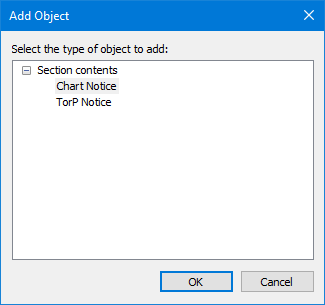
3. Select either Chart Notice or TorP Notice (temporary or preliminary chart notice).
4. Click OK.
