 Catalogue Editor
 Catalogue Editor
Menu | File > Export Database Dictionary to XML |
The Export Dictionary command exports a database dictionary to an XML file that can later be imported into another database dictionary.
You can export the entire dictionary or only the dictionary objects that are in the open profile.
Related commands:
• • • • • • | • • • • • |
Interface
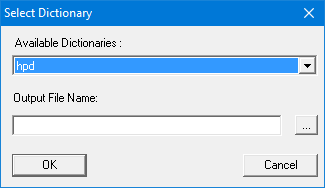
Option | Description |
|---|---|
Available Dictionaries | Dictionaries that can be exported. |
Output File Name | The name of the XML file. |
Procedure to Export a Profiled Dictionary
1. Open a database catalogue,
2. Select a profile
• Only the dictionary objects in that profile will be exported.
3. Select the Export Database Dictionary to XML command.
The Select Dictionary dialog box is displayed.
4. Select a dictionary.
• The dictionary is associated with the active database.
5. Select a name and path for the XML file.
6. Click OK.
Procedure to Export an Entire Dictionary
1. Open a database catalogue,
2. Select a profile
• Only the dictionary objects in that profile will be exported.
3. Select the Export Database Dictionary to XML command.
The Select Dictionary dialog box is displayed.
4. Select a dictionary.
• The dictionary is associated with the active database.
5. Select a name and path for the XML file.
Click OK.