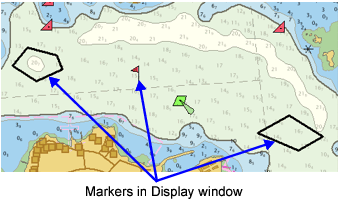
Markers are notes that provide information or instructions about work being performed on a feature, a selection of features, or a geographic area. They remain with the object as part of its history to explain aspects of its creation and certification.
Markers can be a means of communication amongst the individuals who create, modify, or certify features, or they can be a “note to self”, such as a reminder to check a piece of data.
Markers include text and graphics that explains or illustrates the work required and can overlay information stored in the database. A marker can be directly attached to features, or it can be digitized separately and not associated with any feature.
Users who create and edit markers must have the Markup Editor or Markup Verify role. See Database Administration for more information on setting up roles.
Markers are associated with the project where they are created. You can, however, select markers created in other projects if the markers are in the same workspace.
Types of markers:
Marker Type | Description |
|---|---|
User | Usually used as a “note to self”. They can be viewed by any other user. |
Quality Control (QC) | Related to the QC certification process. QC markers can also be viewed by any user. They can provide the reason an object was created the way it was, the reason an object was rejected, and so on. |
Error | Used to denote user-detected errors. |
Notice | Used to denote features or changes that require a higher priority than regular work done in the database. For example, a Notice marker can be used to highlight new features for a Notice to Mariners insert. A Notice marker can have the following states: Submitted, Rejected, Accepted. |
Survey | Used as notes or reminders to survey crews to check real-world features against those on an existing chart, while on a survey. |
Information about markers is displayed in the Markers window and the Marker Detailswindow.
Related commands
• • • • | • • • |