 CARIS HPD Publications Module
 CARIS HPD Publications Module
Menu | Publication > Capture Project |
Tool | |
Copy project information into notices or publications.
The project information that is copied to Publications Module is determined by the selected transformation file.
Related commands:
• • • • • • • | • • • • • • • |
Interface
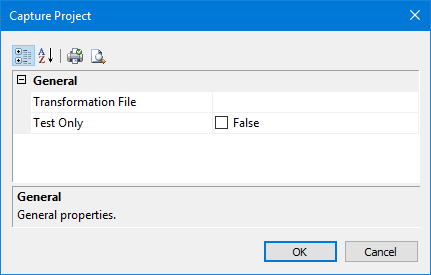
Properties | Description |
|---|---|
Transformation File | The transformation file that contains rules for project information. Click browse (...) to select a file. |
Test Only | True: Run a diagnostic tool to examine the in-memory XML files that are generated from the XSLT processor and customize the XSLT rules. 1. Enable Test Only. A Save As dialog box is displayed. 2. Type the name of the file. 3. Click Save. Two XML files are created and saved to the same directory as the XSLT file: • The input file contains only the information from the HPD editor. It has • The output file contains the Publications Module XML that is created when the input file is combined with the rules from XSLT file. This is the file that is used by Publications Module. It has 4. Click OK. The records are listed in the Notices window. You can view both the False: No test is run. For more information on the in-memory XML documents and XSLT, see the Publications section of the HPD® User Guide. |
Procedure
1. Select a notice, instruction, or publication.
2. Select the Capture Project command.
The Capture Project dialog box is displayed.
3. Select an XSLT file using Transformations File.
4. [Optional] Enable Test Only and name the file.
5. Click OK.
A message tells you what project information has been captured.
6. Click OK.
The feature information is displayed in the selected properties.
