 CARIS HPD Publications Module
 CARIS HPD Publications Module
Menu | Publication > Generate List Record Notices |
Tool | |
Create a notice from an update to a new edition of a list record or from an XSLT transformation file.
This command detects new list records or changes that have not yet been published, and creates a list notice with instructions identifying the changes. It ignores changes that are already incorporated into another list notice.
This command has the option to create a notice with multiple instructions, or individual notices each with their own instruction.
This command is effective only under the following conditions:
• The list record from which the notice is generated must be second edition or higher. This command cannot be used if the list record is a first edition.
• The list record must contain updated material (e.g., new feature, modified attributes). This means that the Update List Record command has already been applied to the new edition (see Update List Record).
• A transformation file must be available for converting the list records to instructions. New notices can also be imported from this file.
Related commands:
• • • • • • • | • • • • • • • |
Interface
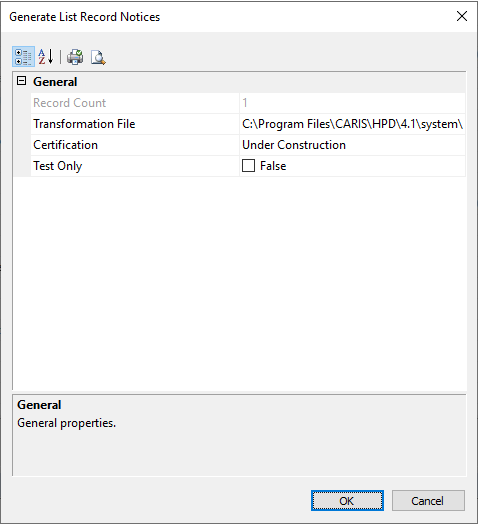
Property | Description |
|---|---|
Feature Count | Total number of updated features. This is a read-only field. |
Transformation File | The path and name of the XSLT file used to convert the list record to an instruction. This file can also be used to import notices. 1. Click Browse. The Open dialog box is displayed. 2. Select an XSLT file. 3. Click Open. The path and name for the file are displayed in the grid. |
Certification | Certification status of the new record: • Under Construction • Not Verified • Accepted • Verified • Rejected. The default is Under Construction. For more information, see Certification. |
Test Only | True: Run a diagnostic tool to examine the in-memory XML files that are generated from the XSLT processor and customize the XSLT rules. 1. Enable Test Only. A Save As dialog box is displayed.f 2. Type the name of the file. 3. Click Save. Two XML files are created and saved to the same directory as the XSLT file: • The input file contains only the information from the HPD editor. It has • The output file contains the Publications Module XML that is created when the input file is combined with the rules from XSLT file. This is the file that is used by Publications Module. It has 4. Click OK. The records are listed in the Notices window. You can view both the False: No test is run. For more information on the in-memory XML documents and XSLT, see Publications in the HPD® User Guide. |
Procedure
1. Select a new edition of a list record in the Object Browser, or select an XSLT file.
2. Select the Generate List Record Notices command.
The Generate List Record Notices dialog box is displayed.
3. Complete the fields in the dialog box (see above table) and click OK.
The Notice Type dialog box is displayed.
4. Select a notice type from the list.
5. Click OK.
The new notice is generated. A message is displayed when the process is completed.
6. Click Close.
The notice, along with instructions, is listed in the Object Browser.
