 Catalogue Editor
 Catalogue Editor
Menu | File > Save As Database Profile |
Save changes in an XML profile to a database catalogue; or, save changes to a database profile to a different database profile.
If you are saving an existing profile to a new version, the previous version is over written by the new version. The over written version cannot be used again.
Related commands:
• • • • • • | • • • • • • |
Interface
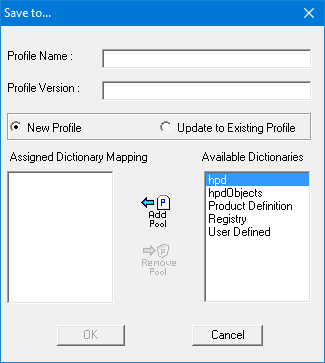
Option | Description |
|---|---|
Profile Name | The name to be given to a new or existing profile. |
Profile Version | The version number of the profile. |
New/Update | • New Profile: Create a new profile. • Update to Existing Profile: Update an existing profile |
Assigned Dictionary Mapping | The dictionaries associated with the profile. |
Available Dictionaries | Dictionaries that can be associated with the profile. |
Procedure
1. Select the Save as Database Profile command.
The Save To dialog box is displayed.
2. Type a name for the profile in the Profile Name field.
3. Type a version number.
4. Select New Profile or Update to Existing Profile.
5. Add or remove dictionaries. See below.
Command | Description |
|---|---|
Add Pool | Associate the profile with one or more dictionaries. 1. Select a dictionary in the Available Dictionaries list.. 2. Click Add Pool. The dictionary is moved to the Assigned Dictionary Mapping list. |
Remove Pool | Remove an association with a profile. 1. Select a dictionary in the Assigned Dictionary Mapping list.. 2. Click Remove Pool. The dictionary is moved to the Available Dictionaries list. |
6. Click OK.