 CARIS HPD Source Editor
 CARIS HPD Source Editor
Menu | Projects > Update Project From Source |
Update an isolated project if a change that was applied in the source is within the extent of the isolated project.
The changes in the source must be submitted and verified before they can be displayed in the project.
Related commands:
• • • • • • • • | • • • • • • • • |
Procedure
1. Open an isolated project in Source Editor.
2. Make a change to the workspace.
3. Select the Update Project from Source command.
A new set of layers is added to the Layers window. These contain the updates and are named according to the type of update.
The change is displayed in the Project Updates layer.
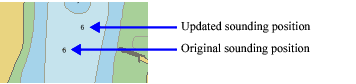
If edges were edited in both source and an isolated project, a conflict is shown if the changes overlap. If the edges do not conflict or overlap no conflict is shown.