Feature Editing : Commands : Digitize Geodetic Circle Using a Centre and a Radius
 

Digitize Geodetic Circle Using a Centre and a Radius


Pop-up

Line Digitizer > Geodetic Circle [centre + radius]

Area Digitizer > Geodetic Circle [centre + radius]

Use with the Create Line Feature or Create Area Feature command.

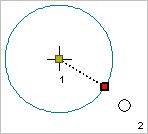
A geodetic circle defined by a centre point and a point defining the radius.

Related commands:

• Close Line

• Digitize Point to Point Line

• Digitize Fitted Curve

• Digitize Geodesic Line

• Digitize Loxodrome

• Digitize Spline

• Digitize Squared Line

• Digitize Stream Line

• Remove Last

• Digitize Arc Using a Centre and Two Points

• Digitize Arc Using Three Points

• Digitize Arc Using Two Points and a Direction

• Digitize Geodetic Arc

• Digitize Rectangle Using Three Points

• Digitize Rectangle Using Two Points

• Digitize Circle Using a Centre and a Radius

• Digitize Circle Using a Two Point Diameter

• Digitize Circle Using Three Points

• Digitize Circle Using Two Points and a Radius

• Digitize Geodetic Circle Using Two Point Diameter

• Digitize Geodetic Circle Using Two Points and a Radius

Procedure

1. Choose the Digitize Geodetic Circle Using a Centre and a Radius command.

2. Click a centre point (1).

3. Press and hold the left mouse button.

4. Drag the cursor to expand the circle to an appropriate size.

5. Release the mouse button (2).

You can click directly on point 2 but pressing and dragging will give you a preview of the circle.

The geodetic circle is created.