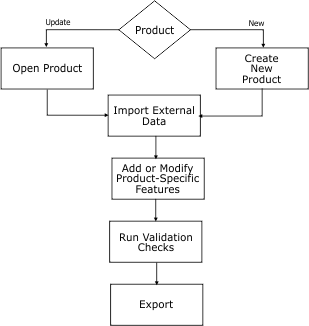
The basic workflow looks like this:
Typically, you process data in the order of the tasks in the chart, although much of the work will be an iterative process where you repeat one or more steps until data is ready for export.
The following commands are used in this workflow.
Open Product
Open an existing product.
I want to... | Refer to... |
|---|---|
Open an existing product | Open File and search for S-57 Product File (*.prd) |
Create Product
Create new products or open existing products and external data.
I want to... | Refer to... |
|---|---|
S‑57 | |
Open an external data set | |
Create S‑57 product from scratch. | |
Create product from an existing file | |
Create product from multiple files. | |
S-100 | |
Create S-100 product | |
Import External Data
Import external data into a new or existing product file. Also, grab specific features from external data sets.
I want to... | Refer to... |
|---|---|
Open external data | |
Import selected data | |
Import as update | |
Import data files | |
Grab features from external data sets. | |
Create vector features from raster data. |
Add/Modify Product Specific Features
Create new features using S‑57 Composer’s digitizing tools or templates. Modify new and existing features using various editing tools. Establish collection and parent-child relationships.
I want to... | Refer to... |
|---|---|
Create product-specific features (All) | |
Create a new area feature | |
Create a new line feature | |
Create a new point feature | |
Create a new sounding feature | |
Create a feature using templates | |
Copy feature class or geometry | |
Import selected or superselected features from an external data set | |
Import data from a text file or product. | |
Import a feature as an update to an existing feature. | |
Create product-specific features - S‑57 | |
Create a collection object | |
Create a parent-child relationship | |
Create product-specific features - S-100 | |
Create information objects | |
Edit and delete product-specific features | |
Change object type or attribute | |
Delete a selection or superselection | |
Edit feature geometry | |
Modify features | |
Apply minimum display scales to features. | |
Remove overshoots | |
Remove undershoots | |
Edit collection objects | |
Edit parent-child relationships | |
Edit information-type objects | |
Group Soundings | |
Divide lines by edges | |
Intersect and cut features | |
Cut and remove features | |
Redo the last undone action | |
Undo the last action | |
Run Validation Checks
Test external and product data for structure and logical consistency. S‑57 Composer uses custom checks and checks based on the S-58 standard for ENC validation.
I want to... | Refer to... |
|---|---|
All | |
Check data structure and consistency | |
Check for dangling edges, overshoots, and undershoots | |
Match features in an external data set to a selected layer. | |
Generate a list of features and associated attributes | |
Export
Export data to an ENC/AML exchange set, as defined in the new product wizard. Export selected features from the product to another file format.
I want to... | Refer to... |
|---|---|
S‑57 | |
Modify an exchange set or create a new one. | |
All | |
Export selected features to an ASCII file | |
Export selected features to a GML file or KML file. | |
Export selected features to a HOB file. | |
Export selected features to a Shape file. | |
Export selected features to a GeoTIFF image | Export to TIFF |
Export selected features to a CARIS file | |