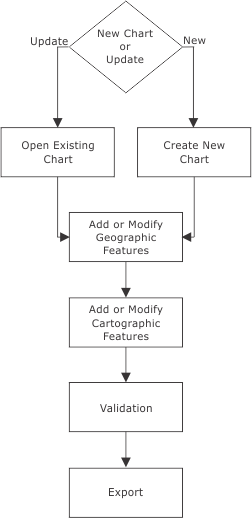
This is the general workflow required to create a chart from a vector file then export the finished chart to another format.
Open Existing Chart
Open an existing chart product
I want to... | Refer to... |
|---|---|
Open an existing Paper Chart Composer product file. |
Create New Chart
Create a new chart and panel from an open external file.
I want to... | Refer to... |
|---|---|
Open an external file to define the extent and data for a new panel. | |
Create a new chart and sheet | |
Create a new panel and define the panel extent from the external file, | |
Populate panel area with data from the external file. |
Add or Modify Geographic Features
Add new geographic features or modify existing features
I want to.... | Refer to... |
|---|---|
Digitize a new area feature. | |
Digitize a new line feature. | |
Digitize a new point feature. | |
Digitize a new sounding feature | |
Copy feature class or geometry. | |
Import features from an external dataset. | |
Import data from database or text file. | |
Change an object type or attribute | |
Modify line features | |
Modify area features | |
Modify edges | |
Delete features |
Add or Modify Cartographic Features
Add new cartographic features or modify existing features.
I want to... | Refer to... |
|---|---|
Create a new area or line feature | |
Create a new point feature | |
Copy feature class or geometry | |
Create panel border | |
Insert legend | |
Insert scale bar | |
Create subsidiary graduation | |
Insert marginalia | |
Insert text | |
Add annotations | |
Add contour labels | |
Insert images | |
Insert light sectors | |
Create and modify borders, legends and scale bars | |
Edit text | |
Mask features |
Validation
Check quality of data (duplicated features, missing or invalid attributes, errors with geometry) so that there is no missing or conflicting information in the chart.
I want to... | Refer to... |
|---|---|
Check data quality of features in a Paper Chart Composer file. | |
Compare features in an external file against a Paper Chart Composer file. | |
Generate a list of features on a panel along with associated attributes. | |
Show all actions taken on a single feature or a group of features. |
Export
Export sheet and panel to another format.
I want to... | Refer to... |
|---|---|
Select an area of a chart for export to TIFF or postscript. | |
Export information about selected features in a panel features to an ASCII file. | |
Export information about selected features in a panel to a Geographic Markup Language (GML) file. | |
Export the contents of a panel to a Shapefile format. | |
Export a panel to a Portable Document Format (PDF) file. | |
Export a panel to AutoCAD formExport Panel to DXFat (DXF) file, | |
Export a panel to a Hydrographic Object Binary (HOB) file. | |
Export a sheet to a postscript file. | |
Export a sheet to postscript or TIFF spot separates, | |
Export a sheet to CMYK TIFF. | |
Export a sheet to PDF. | |
Export a sheet to DXF. | |
Export a chart to TIFF |